Barcode Enhancer
Transform blurry, low-res, or damaged barcodes into flawless, high-resolution prints.
Drop barcode image here, or browse
Screenshots, photos & barcode images
How it works: We extract the hidden data from your barcode and regenerate it perfectly clean. Logos, colors, and frames are automatically removed to guarantee 100% instant scanning on all devices.
Barcode Enhancer
Free online barcode enhancer. Fix blurry barcodes, upscale to 4K resolution, increase error correction. 100% browser-based, no sign-up.
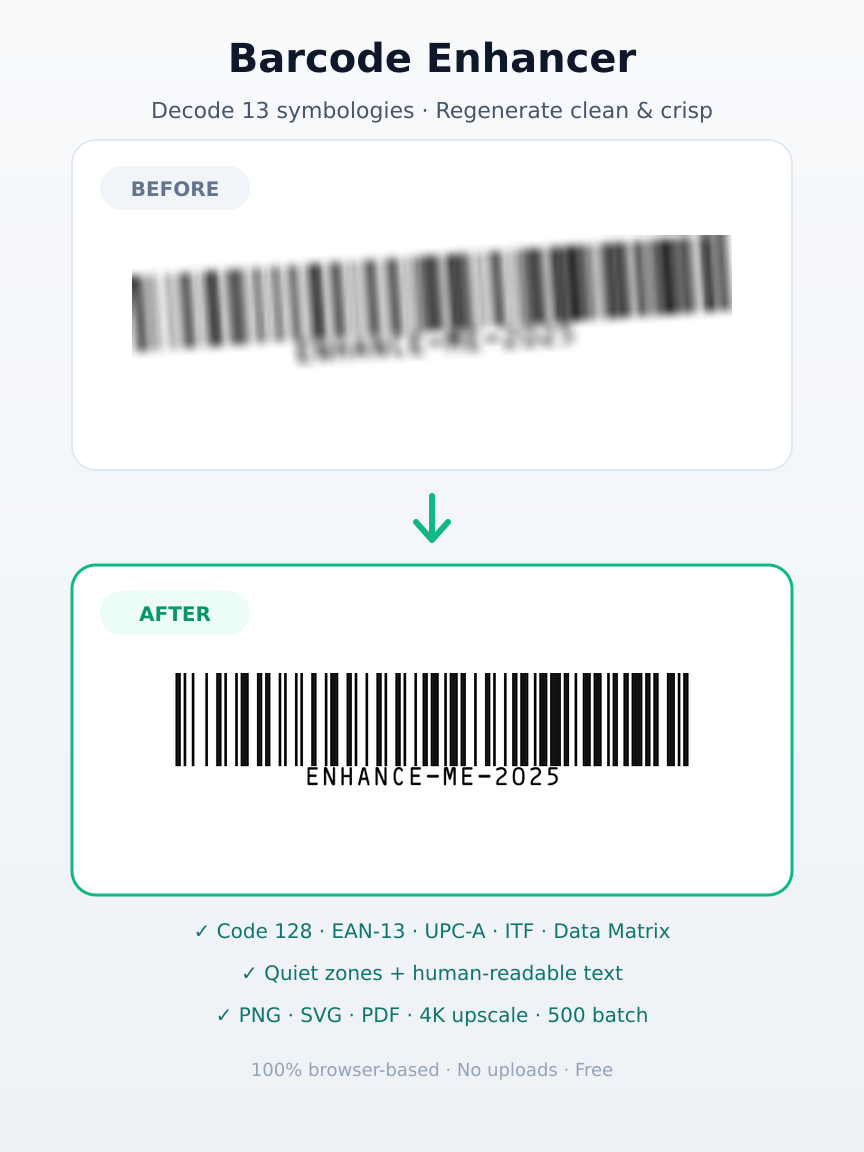
Fix Blurry Barcodes Into Scan-Ready Prints
Upload any barcode image — Code 128, EAN-13, UPC-A, ITF, Data Matrix and more. The tool decodes the data and regenerates a clean, high-resolution barcode with correct quiet zones.
- Auto-decodes 13 barcode symbologies via ZXing
- Regenerates clean, crisp barcodes via bwip-js
- Human-readable text + correct quiet zones
- Upscale originals up to 4K (3840px)
- 7 download formats: PNG, JPG, WebP, SVG, PDF, EPS, Transparent
- Bulk enhance up to 500 barcodes — ZIP export
Enhance Any Barcode in 4 Simple Steps
From uploading a blurry image to downloading a crisp 4K barcode — the entire process takes under 3 seconds.
Upload Barcode Image
Drag and drop, paste from clipboard, or browse to select any barcode image. Screenshots, photos, and downloaded images all work.
- Drag & drop images
- Paste from clipboard (Ctrl+V)
- File browser select
- PNG, JPG, WebP, BMP, GIF supported
Auto Decode & Enhance
The Barcode data is decoded instantly, then a new crisp barcode is generated at your chosen resolution. Logos and frames are removed. B&W contrast forcing cleans all artifacts.
- Instant Barcode data decoding
- Regenerate at up to 4K resolution
- Logos & frames auto-removed
- Black & white contrast forcing
- Quiet zone auto-injection
Customize Settings
Adjust size, format, error correction, colors, and enhancement level. Changes apply instantly with live regeneration — no re-upload needed.
- 6 size presets up to 4K
- 7 output formats
- Custom colors & margins
- 4 enhancement types
Download Enhanced Barcode
Download your enhanced barcode in your chosen format. PNG for web, SVG for print, PDF for documents — every format is free. Download All for bulk export.
- PNG, JPG, WebP raster
- SVG, EPS vector formats
- PDF print-ready output
- Download All as ZIP or multi-page PDF
Powerful Enhancements That Fix Any Barcode
Every enhancement is applied automatically. No configuration needed — just upload and get a perfect barcode.
Upscale to 4K Resolution
Regenerate your barcode at up to 3840 pixels (4K Ultra). At 300 DPI, that produces a barcode 325mm wide — large enough for any print material, billboard, or packaging. Six presets from 256px to 3840px cover every use case.
- 6 size presets: S(256px) to 4K(3840px)
- Enhancement multipliers up to 8x
- Safe canvas dimension limits for memory
- Print size guide: 22mm to 325mm at 300 DPI
Black & White Contrast Forcing
Every pixel in the enhanced barcode is forced to pure black or pure white. This removes JPEG compression artifacts, anti-aliasing blur, gray sub-pixels, and color variations. The result is a razor-sharp barcode that phone cameras read instantly, even in low light or at a distance.
- Removes all JPEG artifacts
- Eliminates anti-aliasing and gray pixels
- Pure black/white for maximum contrast
- Guaranteed reliable phone scanning
Quiet Zone Auto-Injection
The barcode specification requires a white border (quiet zone) at least 4 modules wide on all sides. Without it, phone cameras cannot detect where the barcode starts. The enhancer automatically checks if a quiet zone exists and adds one if missing — especially helpful for closely cropped barcodes.
- Auto-detects missing quiet zone
- Adds 4-module white border automatically
- Checks all 4 sides of the barcode
- Fixes cropped barcodes instantly
Logos & Frames Auto-Removed
The enhancer extracts only the encoded data and regenerates a clean barcode. Logos, custom colors, decorative frames, and background images are automatically removed. This is intentional — a barcode with a logo or frame may look nice but can fail to scan on many phones. The enhanced version guarantees 100% instant scanning on every device, every time.
- Logos in the center are automatically removed
- Decorative frames and borders are stripped
- Custom background images are replaced with solid white
- Guaranteed 100% scan reliability on all devices
500 Barcodes in One Batch
Upload up to 500 barcode images at once and the enhancer processes them all without crashing your browser. The processing engine uses background Web Workers and smart main thread yielding to keep the user interface smooth at 60fps during batch enhancement. Download all enhanced barcodes in one click as a ZIP or multi-page PDF.
- Up to 500 barcodes per batch
- Browser stays responsive during processing
- Progress overlay with file count and percentage
- Download All as ZIP or multi-page PDF
7 Download Formats for Every Use Case
From web images to professional print — download your enhanced barcode in the exact format you need. All formats are free.
PNG
Standard Raster
Universal image format for web, email, and digital use. Lossless quality with every pixel sharp.
JPG
Social & Email
Compressed format ideal for sharing on social media, email attachments, and messaging apps.
WebP
Modern Web
Next-gen web format with smaller file sizes. Perfect for websites and web applications.
Transparent PNG
No Background
PNG with transparent background. Place your barcode on any colored surface, poster, or design.
SVG
Vector
Scalable vector format that never pixelates. Ideal for large prints, signs, and any size display.
Print Ready
Document format ready for professional printing. Embed in reports, flyers, and business cards.
EPS
Pro Print
Professional print format used by designers and print shops. Maximum quality for commercial printing.
4 Enhancement Types for Every Barcode Problem
Choose the right enhancement for your situation, or use 'All' for the best result.
Sharpen — Maximum Resolution
Forces pure black and white pixels with a minimum 2048px resolution. Strips all JPEG artifacts, anti-aliasing, and gray sub-pixels. Best for fixing blurry barcodes that fail to scan.
barcode looks blurry, has gray edges, or fails to scan
Upscale — Size Boost
Regenerates the barcode at 2x to 8x the base resolution without changing error correction. Produces a larger, sharper barcode ideal for printing on posters, signs, and packaging.
barcode is too small for printing or looks pixelated when enlarged
Repair — High Error Correction
Forces the highest error correction level (H = 30% recovery) so the barcode can survive damage, dirt, partial covering, or poor print quality. Best for outdoor and industrial use.
barcode will be printed on materials that get damaged or dirty
All — Full Enhancement
Applies all three enhancements at once: sharpening, upscaling, and maximum error correction. The ultimate fix for any barcode problem. Recommended for most situations.
You want the best possible barcode quality — this is the default
Change Any Setting and See Results Instantly
No need to re-upload your image. Adjust any setting and the enhanced barcode regenerates automatically in real time.
Size Presets
6 presets from Small (256px) to 4K Ultra (3840px). Each preset shows the exact print size at 300 DPI.
Error Correction
4 levels from L (7% recovery) to H (30% recovery). Higher levels make the barcode more durable against damage.
Custom Colors
Set custom foreground and background colors. High contrast between colors ensures reliable scanning.
Margin Control
Adjust the quiet zone width (white border) around the barcode. More margin means easier scanning from a distance.
See the Difference Side by Side
Toggle Compare mode to see your original blurry barcode next to the enhanced version. The difference is dramatic — gray artifacts disappear, pixels become razor sharp, and the quiet zone border ensures reliable scanning.
- Original image on the left, enhanced on the right
- One toggle switch to turn compare mode on and off
- Zoom in on both images to see pixel-level detail
- Works with any enhancement setting and format
BEFORE
Blurry, artifacts
AFTER
Sharp, 4K, clean
Side-by-side comparison
Your Barcode Images Never Leave Your Device
No server uploads. No cloud processing. No data collection. Everything runs locally in your browser.
100% Browser-Based
All barcode decoding, enhancement, and generation happens in your browser. No images are uploaded to any server.
Zero Data Uploads
Your barcode images and decoded content never leave your device. No server processing, no API calls for enhancement.
Works Offline
Once the page loads, the enhancer works without an internet connection. Barcode generation and enhancement are fully local.
Web Worker Processing
Heavy pixel processing runs in a background Web Worker using OffscreenCanvas, keeping the main thread smooth at 60fps.
Barcode Enhancement for Every Industry
From print shops to factories, see how professionals use QREndless enhancer to fix, upscale, and export barcodes faster.
Print & Packaging
Enhance barcodes for product packaging, business cards, flyers, and brochures. Download as SVG or PDF for perfect print quality at any size. 4K resolution produces a 325mm barcode at 300 DPI — large enough for any packaging. Download All exports multiple product barcodes as one multi-page PDF for your print shop.
Digital Marketing
Create high-resolution barcodes for websites, digital ads, email signatures, and social media posts. PNG and WebP formats are optimized for screens and fast loading. Transparent PNG lets you overlay barcodes on any background. Batch export all your campaign barcodes as a ZIP file for quick distribution.
Manufacturing & Industrial
Use Repair mode with H error correction (30% recovery) to create barcodes that survive harsh environments — dirt, scratches, chemicals, and UV exposure. Download as SVG or EPS for laser engraving and industrial marking. Quiet zone injection ensures reliable scanning even on rough surfaces.
Retail & E-Commerce
Enhance product label barcodes in bulk and download all at once with the Download All button. PNG files are bundled into a ZIP for quick import into product management systems. Multi-page PDF export sends all barcodes to your label printer in one document. Fast batch processing handles hundreds of product codes.
Education & Events
Bulk enhance barcodes for event tickets, course materials, and attendance sheets. The Download All button exports all enhanced barcodes in one click — as ZIP or multi-page PDF. Free with no limits, perfect for schools and event organizers on a budget. Each barcode scans reliably even from a distance.
Design & Branding
Set custom foreground and background colors to match your brand identity. Download transparent PNG for overlaying on any design. SVG format integrates with Adobe Illustrator and Figma. Save your color settings as a JSON design file and apply the same brand look to every barcode you enhance.
Every Barcode Quality Problem — Fixed
Real problems that real people have with barcodes, and exactly how the enhancer solves each one.
Problem
barcode is blurry and phones cannot scan it
Solution
Black and white contrast forcing strips all gray pixels and artifacts, producing a razor-sharp barcode that scans instantly on any phone camera.
Problem
barcode is too small for printing
Solution
Upscale to 4K resolution (3840px) — produces a 325mm barcode at 300 DPI for any print size, from business cards to billboards.
Problem
barcode has no white border (quiet zone)
Solution
Auto-detects missing quiet zone and adds the required 4-module white border for reliable scanning on all devices.
Problem
barcode gets damaged or dirty in real use
Solution
Repair mode forces highest error correction (H = 30% recovery) so the code survives damage, dirt, and partial covering.
Problem
barcode has JPEG compression artifacts
Solution
Contrast forcing converts every pixel to pure black or white, removing all compression artifacts and anti-aliasing blur.
Problem
Need barcode in SVG or PDF for print
Solution
7 download formats including SVG, PDF, and EPS for professional print production with infinite scaling quality.
Problem
barcode was cropped too closely
Solution
Quiet zone injection adds the mandatory white border that scanning apps need to detect the code — automatic, no manual adjustment.
Problem
Need to match brand colors
Solution
Custom foreground and background colors with transparent PNG support for any design overlay or brand requirement.
Problem
Need to download all enhanced barcodes at once
Solution
Download All button exports all enhanced barcodes in one click — raster formats (PNG, JPG, WebP) as ZIP, SVG/EPS as ZIP, or all as a multi-page PDF.
Problem
Downloading barcodes one by one takes too long
Solution
Batch export with Download All bundles all enhanced barcodes into a single ZIP or multi-page PDF. No more clicking download on each file individually.
Problem
My barcode has a logo and now it will not scan
Solution
The enhancer automatically removes logos, frames, and decorations from the center of your barcode. This guarantees 100% scanning reliability on all devices. Your encoded data (URL, text, etc.) stays exactly the same.
Problem
Need to enhance hundreds of barcodes at once
Solution
Upload up to 500 barcodes in one batch. The browser stays smooth during processing using background Web Workers. Download All exports them as one ZIP or multi-page PDF when done.
Every Feature Is Free — No Exceptions
No premium tiers, no subscriptions, no credit card, no sign-up, no watermarks, no resolution limits, no usage caps.
Free Forever Guarantee
This enhancer will never charge you. No premium tiers will ever be added. Every feature you see today — including Download All bulk export, 4K upscaling, and all 7 formats — will remain free tomorrow, next month, and forever.
Frequently Asked Questions
Everything you need to know about this free barcode enhancer.
More Barcode Tools
Pick the right tool for the job.
Barcode Generator
Create 100+ barcode types
Barcode Embed
Embed barcodes in HTML
Barcode Labels
Print Avery label sheets
Barcode Lookup
Identify any product barcode
Barcode Scanner
Scan with camera or upload
Barcode Validator
Validate check digit & format
Barcode Verifier
Soft-verify barcode quality
Bulk Barcode
Generate 100+ barcodes at once
Check Digit Calculator
Compute GS1 mod-10/mod-11
GS1 Digital Link
Build Sunrise 2027 URLs
GS1 Prefix Lookup
Identify barcode country
SSCC-18 Generator
Serial shipping container codes
ZPL Generator
Zebra ZPL II label code
Ready to Fix Your Blurry Barcode?
Upload any barcode image and get a crisp, high-resolution, scan-ready barcode in seconds. Up to 4K resolution, 7 formats, logos auto-removed, 500 batch, Download All bulk export. All free, forever. No sign-up required.
QREndless · 100% Browser-Based Enhancement · No Server Processing · Your Data Never Leaves Your Device
Barcode Enhancer — Fix Blurry Barcodes & Upscale to 4K Free Online
Fix blurry, damaged or low-quality barcodes. Decodes 13 symbologies (Code 128, Code 39, EAN-13, EAN-8, UPC-A, UPC-E, ITF, Codabar, Data Matrix, QR, PDF417, Aztec) and regenerates a clean, high-resolution copy with correct quiet zones. Print-ready PNG, SVG, PDF export — free & browser-based.
Key Features
- Blur fix & sharpen
- 4K upscale
- 13 symbologies auto-detected
- Quiet zone addition
- Print-ready export
- PNG, SVG, PDF output
Popular Use Cases
- Retail product labels
- Warehouse & logistics
- Inventory management
- Packaging print production
- Healthcare wristbands
- Ticketing & events